
Overview
By default, CCS runs CLIProxyAPI as a local binary on your machine. With Remote Proxy, you can connect to a CLIProxyAPI server running on a different machine—Docker container, Kubernetes pod, or dedicated server. Use cases:- Run CLIProxyAPI on a powerful server while working from a laptop
- Share a single CLIProxyAPI instance across multiple machines
- Deploy CLIProxyAPI in Docker/Kubernetes for team use
- Reduce local resource usage
Configuration Methods
CCS supports three ways to configure remote proxy, with the following priority:Skip Local OAuth
When connecting to a remote proxy with authentication, you can skip local OAuth entirely. This is useful when the remote server already has authenticated tokens. How it works:- If
--proxy-auth-tokenis provided, CCS skips local OAuth flow - The remote server handles all authentication
- No local token storage needed
- Shared team proxy with centralized auth
- CI/CD pipelines using pre-authenticated remote proxy
- Docker/Kubernetes deployments with service tokens
Dashboard Configuration
The easiest way to configure remote proxy is via the web dashboard:- Run
ccs configto open the dashboard - Navigate to Settings → Proxy tab
- Select Remote mode
- Enter your remote server details:
- Host: Server hostname or IP address
- Port: CLIProxyAPI port (default: 8317)
- Protocol: HTTP or HTTPS
- Auth Token: Optional authentication token
- Backend: Select CLIProxy backend (original/plus)
- Click Test Connection to verify connectivity
- Configure fallback options as needed
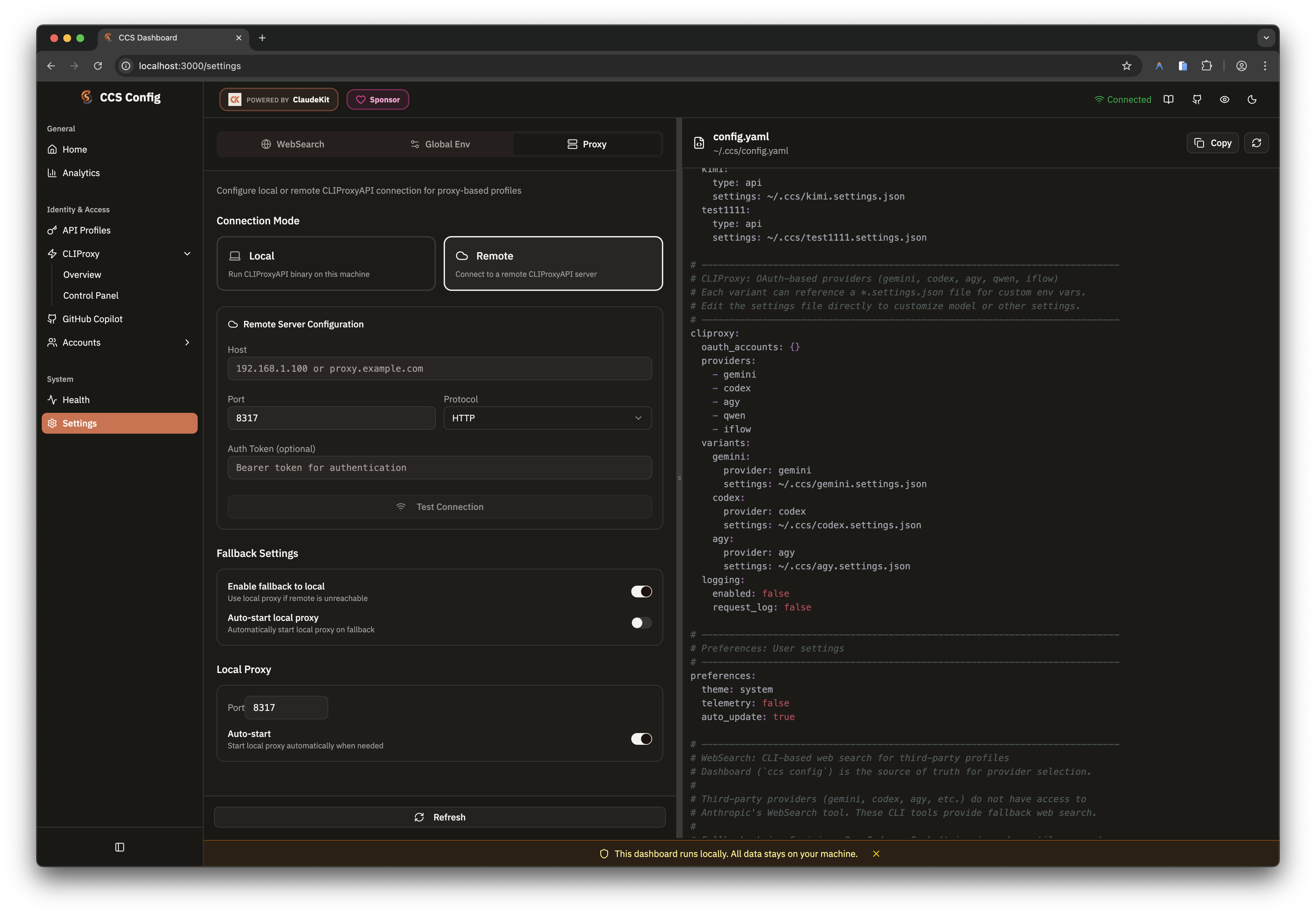
Available since v7.37.0 - Backend switching allows choosing between original CLIProxyAPI and CLIProxyAPIPlus backends.
Backend Selection
Available Backends:original- Standard CLIProxyAPI (default)plus- CCS-maintained CLIProxyAPIPlus community fork for plus-only providers
HTTPS Tunnel
When using--proxy-protocol https, CCS automatically starts a local HTTP→HTTPS tunnel that forwards requests to the remote HTTPS server. This is required because Claude Code’s HTTP client (undici) doesn’t support HTTPS in ANTHROPIC_BASE_URL.
Architecture Flow:
- Automatic activation - No manual flag needed, activates when
protocol=https - Self-signed certificate support - Use
--allow-self-signedfor dev/test environments - Transparent streaming - No buffering, preserves real-time streaming
- Authorization injection - Auth token automatically added to outbound HTTPS requests
- No SSL configuration - Tunnel handles all HTTPS complexity internally
- Tunnel binds to random available port on localhost
- Only Claude Code can access the tunnel (127.0.0.1)
- Tunnel terminates when CCS session ends
- No manual SSL certificate installation required
Config File
Add thecliproxy_server section to ~/.ccs/config.yaml:
Configuration Options
Remote Settings
Remote Settings
Fallback Settings
Fallback Settings
Local Settings
Local Settings
CLI Flags
Override configuration for a single command:Available Flags
Environment Variables
For CI/CD pipelines and automation:Available Variables
Docker Deployment
Run CLIProxyAPI in a Docker container:Kubernetes Deployment
Deploy CLIProxyAPI as a Kubernetes service:Fallback Behavior
When remote proxy is enabled but unreachable:-
With fallback enabled (default):
- CCS prompts: “Remote proxy unreachable. Start local proxy? [Y/n]”
- If auto-start enabled, starts local proxy automatically
- Continues with local proxy
-
With
--remote-onlyflag:- CCS fails immediately with error message
- No fallback, no prompt
-
In non-interactive mode (no TTY):
- Falls back to local if
fallback.enabled: true - Fails if fallback disabled or auto-start disabled
- Falls back to local if
Troubleshooting
Connection Refused
Connection Refused
Error:
Remote proxy unreachable: Connection refusedSolutions:- Verify the remote server is running:
curl http://HOST:PORT/health - Check firewall rules allow port 8317
- Ensure correct host/port configuration
Authentication Failed
Authentication Failed
Error:
Remote proxy unreachable: Authentication failedSolutions:- Verify auth token matches server configuration
- Check token is correctly set (no extra spaces/quotes)
- Ensure server requires authentication
Timeout
Timeout
Error:
Remote proxy unreachable: TimeoutSolutions:- Check network connectivity to remote host
- Verify no proxy/VPN blocking the connection
- Increase timeout in config if needed
Self-Signed Certificate
Self-Signed Certificate
Warning: When using HTTPS with self-signed certificatesCCS automatically allows self-signed certificates when protocol is
https.
A warning is displayed in verbose mode.Security Considerations
Best practices:- Use
--proxy-auth-tokenfor authenticated access - Deploy behind a reverse proxy (nginx, Caddy) for HTTPS
- Limit network access to trusted IPs
- Rotate auth tokens periodically