
CCS Bar
CCS Bar is the native macOS menu-bar companion for CCS. It gives you a fast quota and spend glance without opening the dashboard, then lets you jump into account controls when you need them.CCS Bar is macOS-only. It talks to your local CCS server over loopback and
does not call Claude, Codex, or CLIProxy providers directly.
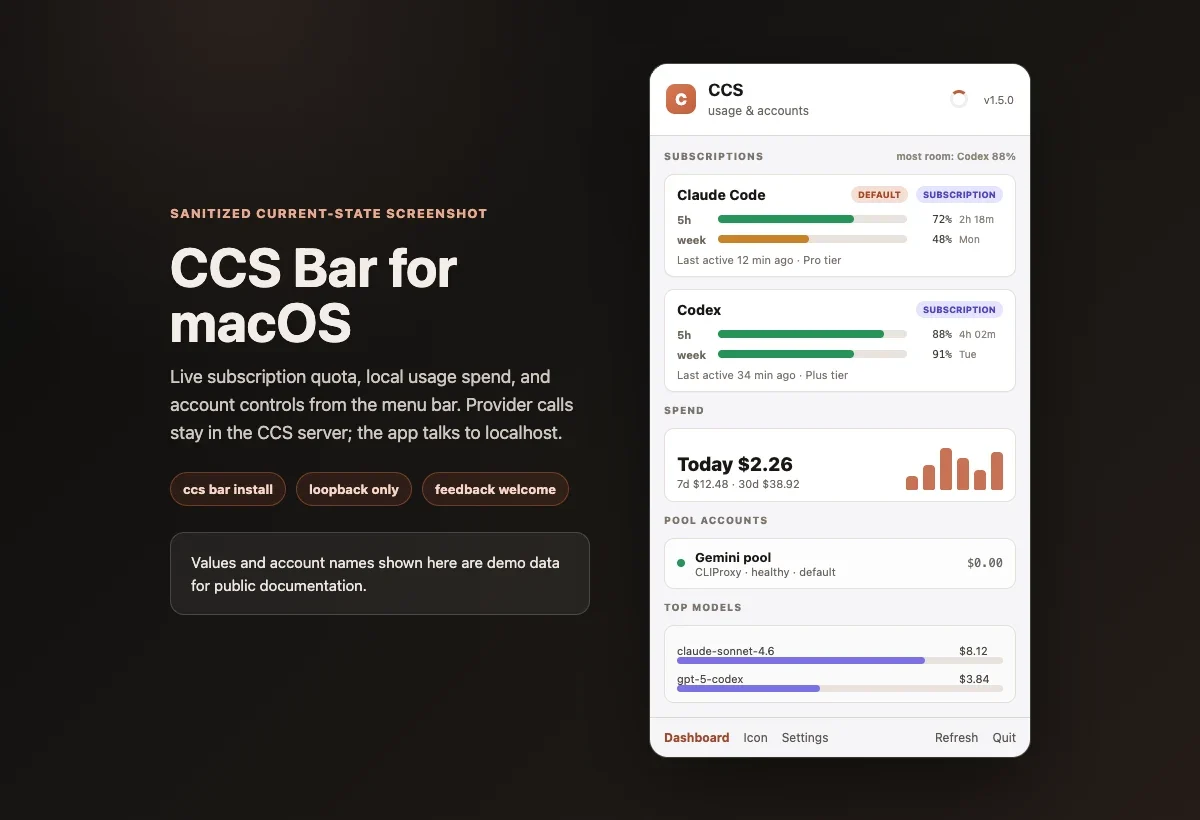
Current Snapshot
Install And Run
1
Install the app
CCS Bar.app from the ccs-bar-latest release into
~/Applications, clears the macOS Gatekeeper quarantine, and records how to
start the local server so the app can launch it on its own.2
Open it like any Mac app
Launch CCS Bar from Spotlight, Finder, or the Dock. The first time you open
the menu, it starts the local CCS server in the background and connects. You
do not need to keep a terminal open.
3
Or start it from the CLI
ccs bar starts the server in the background and returns your prompt right
away, then opens the app. If a server is already running it reuses it. Add
--port to choose an exact loopback port.4
Reinstall or remove when needed
Updating
CCS Bar keeps itself current. When a newer build is published it shows an Update available row at the top of the menu. Click Update Now and the app downloads the new version, replaces itself, and reopens. You never need a terminal. Automatic checks are on by default. You can turn them off in Settings > Updates (“Check for CCS Bar updates automatically”). You can also update at any time from the CLI withccs bar install, which always fetches the latest
published build.
The in-app updater runs ccs bar install for you, so keep the CCS CLI on your
PATH and reasonably up to date.
Commands
Port And Lifecycle Behavior
--portaccepts only an integer from1to65535. CCS fails instead of silently choosing another port when the value is invalid or occupied.- The selected port is sticky. Later launches try it first, including after
ccs bar stop; if it is unavailable, a launch without--portcan use a standard fallback port. - When moving a running server, CCS checks the destination before stopping the current server. If the replacement cannot start or become ready, CCS tries to restore the prior server. If restoration also fails, it preserves the prior discovery and launch files for recovery.
ccs bar stopverifies both the PID and the process start identity before it sendsSIGTERM. A mismatch, permission error, signal failure, or timeout leaves the recovery files untouched instead of risking another process or losing diagnostic state.
What It Shows
Native subscription quota
Claude Code and Codex rows show quota windows, reset timing, and the
tightest remaining window first. Codex usage refreshes live, and a refresh
control on the card pulls the latest reading on demand.
Spend at a glance
A spend chart you can switch between Today, 7-day, and 30-day, with
time-axis labels (hours for today, days for the wider windows). Totals come
from local CCS usage data.
Account control
Pause, resume, set default, solo an account, or use tier-lock from the menu.
Dashboard handoff
Open the dashboard, refresh data, change icon style, or open settings
without leaving the menu.
How It Works

~/.ccs:
~/.ccs/bar.json looks like this:
Provider traffic stays in CCS. The native app only talks to localhost.
Panel Map

- Header: CCS identity, app version, refresh state
- Subscriptions: Claude Code and Codex first, sorted by the tightest quota
- Spend: a Today / 7-day / 30-day chart with time-axis labels below quota
- Pool accounts: CLIProxy account rows after native subscriptions
- Footer: dashboard, icon style, settings, refresh, quit
Feedback Wanted
CCS Bar is new enough that real workflow feedback matters. Please open an issue for rough edges, missing controls, unclear quota labels, menu sizing, install friction, or any idea that would make the bar more useful.Report an issue
Bugs, confusing states, install problems, and missing provider data.
Suggest an improvement
Workflow ideas, panel layout feedback, and new account actions.