> ## Documentation Index
> Fetch the complete documentation index at: https://docs.ccs.kaitran.ca/llms.txt
> Use this file to discover all available pages before exploring further.
# Configuration
> CCS configuration file format, paths, and management
# Configuration
CCS uses a unified YAML configuration file. Current schema version: **13**.
## Config File Location
```bash theme={null}
~/.ccs/config.yaml
```
```powershell theme={null}
%USERPROFILE%\.ccs\config.yaml
```
## Config Structure
```yaml theme={null}
version: 13
default: default
accounts:
work:
config_dir: ~/.ccs/instances/work
context_mode: isolated
profiles:
glm:
settings_file: ~/.ccs/glm.settings.json
km:
settings_file: ~/.ccs/km.settings.json
cliproxy:
providers: {}
proxy:
profile_ports: {}
thinking:
mode: auto
budget: 8192
browser:
claude:
enabled: false
policy: manual
codex:
enabled: false
policy: manual
channels:
enabled: [telegram, discord]
image_analysis:
enabled: true
```
### Key Sections
| Section | Purpose |
| ---------------- | ----------------------------------------------------------- |
| `version` | Config schema version (current: 13) |
| `default` | Default profile used when running `ccs` with no arguments |
| `accounts` | Named Claude account instances with isolated directories |
| `profiles` | API key profile references (settings JSON files) |
| `cliproxy` | CLIProxy OAuth provider settings |
| `proxy` | OpenAI-compatible local proxy ports and routing |
| `thinking` | Extended thinking defaults for supported providers |
| `browser` | Claude Browser Attach and Codex Browser Tools policy |
| `channels` | Official channel integrations (Telegram, Discord, iMessage) |
| `image_analysis` | Vision/image analysis feature toggle |
## Config Precedence
Settings are resolved in this order (highest to lowest priority):
```
CLI Flags > Environment Variables > config.yaml > Built-in Defaults
```
For example, `--proxy-host` overrides `CCS_PROXY_HOST`, which overrides
`config.yaml`.
## Dashboard Management
The easiest way to manage config is through the dashboard:
```bash theme={null}
ccs config
```
The dashboard opens in your browser on the current session URL. It provides a
GUI for:
* managing OAuth provider accounts and tokens
* creating and editing API profiles
* viewing real-time quota status
* configuring proxy and advanced settings
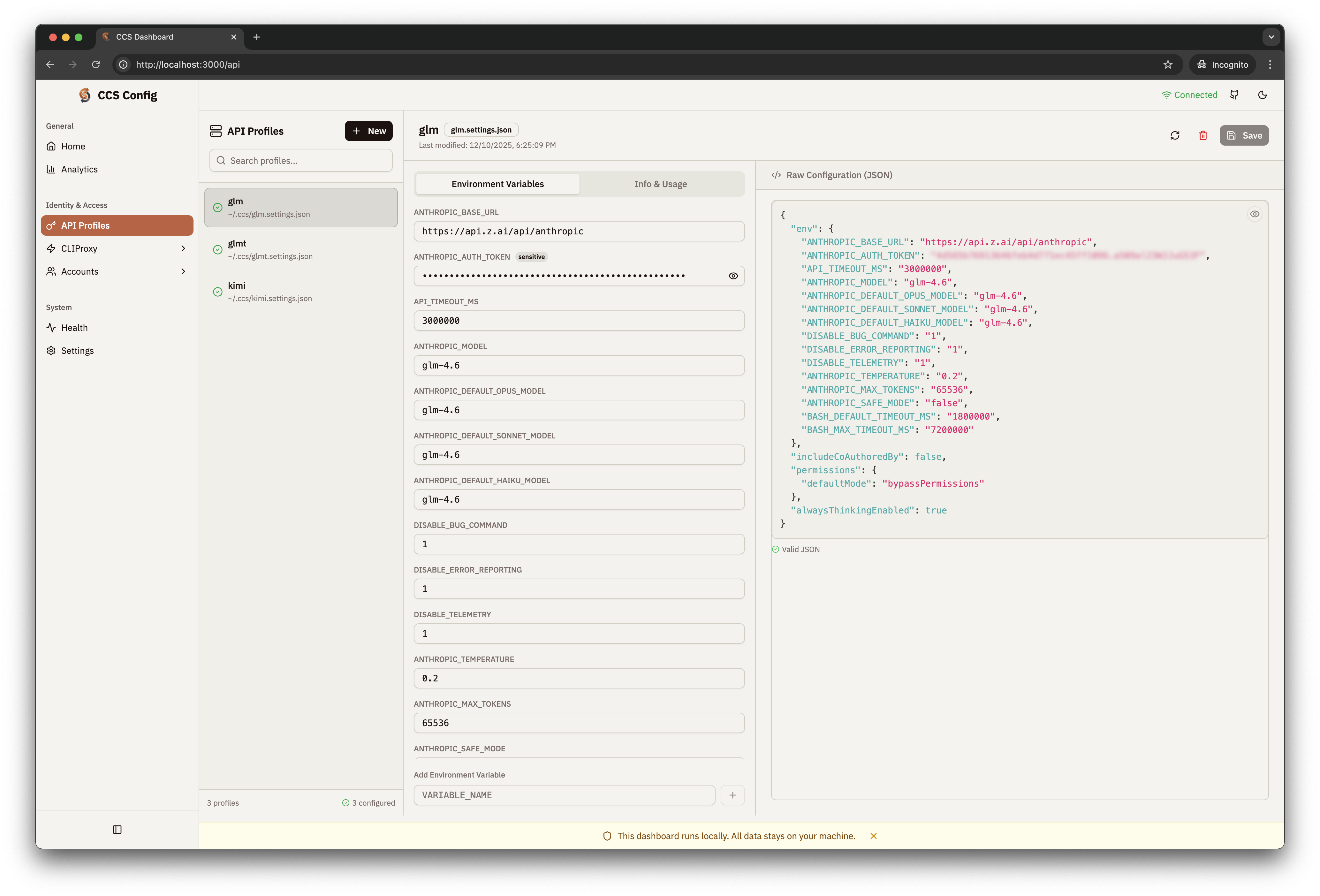 ## Profile Settings Files
API profiles reference a `.settings.json` file with environment variable
overrides:
```json theme={null}
{
"env": {
"ANTHROPIC_BASE_URL": "https://api.z.ai/api/anthropic",
"ANTHROPIC_AUTH_TOKEN": "your_api_key",
"ANTHROPIC_MODEL": "glm-5.2"
}
}
```
All `env` values must be strings. Booleans or objects will cause crashes on
Windows PowerShell.
## Environment Variables
### Core
| Variable | Description | Default |
| ----------------- | ------------------------------- | -------------------- |
| `CCS_CONFIG` | Override config file location | `~/.ccs/config.yaml` |
| `NO_COLOR` | Disable colored terminal output | `false` |
| `CCS_CLAUDE_PATH` | Override Claude CLI binary path | Auto-detected |
| `CCS_DEBUG` | Enable verbose debug logging | `false` |
### Remote Proxy
| Variable | Description | Example |
| ---------------------------- | ---------------------------------------- | ------------------- |
| `CCS_PROXY_HOST` | Remote proxy hostname | `proxy.example.com` |
| `CCS_PROXY_PORT` | Remote proxy port | `8317` |
| `CCS_PROXY_AUTH_TOKEN` | Proxy authentication token | `your-token` |
| `CCS_PROXY_PROTOCOL` | Protocol (`http`/`https`) | `https` |
| `CCS_PROXY_FALLBACK_ENABLED` | Fall back to local proxy if remote fails | `true` |
| `CCS_ALLOW_SELF_SIGNED` | Accept self-signed SSL certificates | `false` |
### Integration and Migration
| Variable | Description |
| -------------------- | ------------------------------------------ |
| `CCS_SKIP_MIGRATION` | Skip automatic config migration on startup |
| `CCS_UNIFIED_CONFIG` | Enable unified config mode (`config.yaml`) |
| `CCS_WEBSEARCH_SKIP` | Disable WebSearch hook integration |
| `CCS_SKIP_PREFLIGHT` | Skip API key validation on startup |
## Migration from v1 JSON
If you have a legacy `~/.ccs/config.json`, CCS migrates it to `config.yaml`
automatically on first run after upgrade. No manual action needed.
To trigger migration manually:
```bash theme={null}
CCS_MIGRATE=true ccs
```
## Next Steps
Run a complete first provider flow after configuration
Create profiles for Anthropic, GLM, Kimi, and more
Configure multiple Claude account instances
Compare all supported providers
## Profile Settings Files
API profiles reference a `.settings.json` file with environment variable
overrides:
```json theme={null}
{
"env": {
"ANTHROPIC_BASE_URL": "https://api.z.ai/api/anthropic",
"ANTHROPIC_AUTH_TOKEN": "your_api_key",
"ANTHROPIC_MODEL": "glm-5.2"
}
}
```
All `env` values must be strings. Booleans or objects will cause crashes on
Windows PowerShell.
## Environment Variables
### Core
| Variable | Description | Default |
| ----------------- | ------------------------------- | -------------------- |
| `CCS_CONFIG` | Override config file location | `~/.ccs/config.yaml` |
| `NO_COLOR` | Disable colored terminal output | `false` |
| `CCS_CLAUDE_PATH` | Override Claude CLI binary path | Auto-detected |
| `CCS_DEBUG` | Enable verbose debug logging | `false` |
### Remote Proxy
| Variable | Description | Example |
| ---------------------------- | ---------------------------------------- | ------------------- |
| `CCS_PROXY_HOST` | Remote proxy hostname | `proxy.example.com` |
| `CCS_PROXY_PORT` | Remote proxy port | `8317` |
| `CCS_PROXY_AUTH_TOKEN` | Proxy authentication token | `your-token` |
| `CCS_PROXY_PROTOCOL` | Protocol (`http`/`https`) | `https` |
| `CCS_PROXY_FALLBACK_ENABLED` | Fall back to local proxy if remote fails | `true` |
| `CCS_ALLOW_SELF_SIGNED` | Accept self-signed SSL certificates | `false` |
### Integration and Migration
| Variable | Description |
| -------------------- | ------------------------------------------ |
| `CCS_SKIP_MIGRATION` | Skip automatic config migration on startup |
| `CCS_UNIFIED_CONFIG` | Enable unified config mode (`config.yaml`) |
| `CCS_WEBSEARCH_SKIP` | Disable WebSearch hook integration |
| `CCS_SKIP_PREFLIGHT` | Skip API key validation on startup |
## Migration from v1 JSON
If you have a legacy `~/.ccs/config.json`, CCS migrates it to `config.yaml`
automatically on first run after upgrade. No manual action needed.
To trigger migration manually:
```bash theme={null}
CCS_MIGRATE=true ccs
```
## Next Steps
Run a complete first provider flow after configuration
Create profiles for Anthropic, GLM, Kimi, and more
Configure multiple Claude account instances
Compare all supported providers