> ## Documentation Index
> Fetch the complete documentation index at: https://docs.ccs.kaitran.ca/llms.txt
> Use this file to discover all available pages before exploring further.
# CCS Bar
> Native macOS menu-bar companion for quota, spend, and account controls
# CCS Bar
CCS Bar is the native macOS menu-bar companion for CCS. It gives you a fast
quota and spend glance without opening the dashboard, then lets you jump into
account controls when you need them.
CCS Bar is macOS-only. It talks to your local CCS server over loopback and
does not call Claude, Codex, or CLIProxy providers directly.
CCS Bar v1 expects the default local CCS data directory at `~/.ccs`. Custom
`CCS_HOME` or `CCS_DIR` layouts may not be discovered by the native app yet.
## Current Snapshot
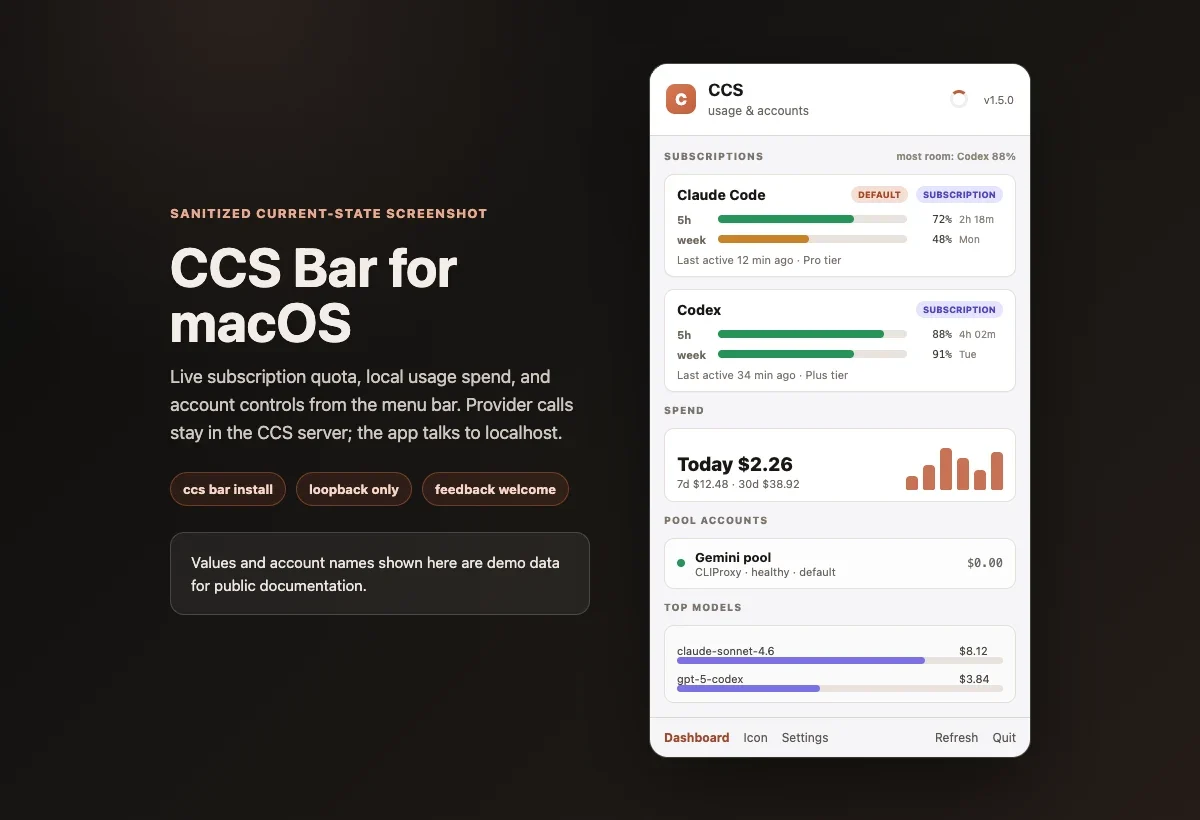 The screenshot uses sanitized demo account names and usage values. The layout
matches the current panel structure: native subscription rows first, spend
summary next, pool accounts below, and quick actions in the footer.
## Install And Run
```bash theme={null}
ccs bar install
```
This downloads `CCS Bar.app` from the `ccs-bar-latest` release into
`~/Applications`, clears the macOS Gatekeeper quarantine, and records how to
start the local server so the app can launch it on its own.
Launch CCS Bar from Spotlight, Finder, or the Dock. The first time you open
the menu, it starts the local CCS server in the background and connects. You
do not need to keep a terminal open.
```bash theme={null}
ccs bar
```
`ccs bar` starts the server in the background and returns your prompt right
away, then opens the app. If a server is already running it reuses it.
```bash theme={null}
ccs bar install --launch
ccs bar uninstall
```
## Updating
CCS Bar keeps itself current. When a newer build is published it shows an
**Update available** row at the top of the menu. Click **Update Now** and the app
downloads the new version, replaces itself, and reopens. You never need a
terminal.
Automatic checks are on by default. You can turn them off in **Settings >
Updates** ("Check for CCS Bar updates automatically"). You can also update at any
time from the CLI with `ccs bar install`, which always fetches the latest
published build.
The in-app updater runs `ccs bar install` for you, so keep the CCS CLI on your
PATH and reasonably up to date.
## Commands
| Command | What it does |
| ------------------- | ------------------------------------------------------------------------------------------------ |
| `ccs bar` | Start the background server if needed, then open the app |
| `ccs bar stop` | Stop the background server |
| `ccs bar status` | Show whether the background server is running |
| `ccs bar serve` | Run the server in the current terminal (advanced; `ccs bar` runs this for you in the background) |
| `ccs bar install` | Install or update the app |
| `ccs bar uninstall` | Remove the app |
## What It Shows
Claude Code and Codex rows show quota windows, reset timing, and the
tightest remaining window first. Codex usage refreshes live, and a refresh
control on the card pulls the latest reading on demand.
A spend chart you can switch between Today, 7-day, and 30-day, with
time-axis labels (hours for today, days for the wider windows). Totals come
from local CCS usage data.
Pause, resume, set default, solo an account, or use tier-lock from the menu.
Open the dashboard, refresh data, change icon style, or open settings
without leaving the menu.
## How It Works
The screenshot uses sanitized demo account names and usage values. The layout
matches the current panel structure: native subscription rows first, spend
summary next, pool accounts below, and quick actions in the footer.
## Install And Run
```bash theme={null}
ccs bar install
```
This downloads `CCS Bar.app` from the `ccs-bar-latest` release into
`~/Applications`, clears the macOS Gatekeeper quarantine, and records how to
start the local server so the app can launch it on its own.
Launch CCS Bar from Spotlight, Finder, or the Dock. The first time you open
the menu, it starts the local CCS server in the background and connects. You
do not need to keep a terminal open.
```bash theme={null}
ccs bar
```
`ccs bar` starts the server in the background and returns your prompt right
away, then opens the app. If a server is already running it reuses it.
```bash theme={null}
ccs bar install --launch
ccs bar uninstall
```
## Updating
CCS Bar keeps itself current. When a newer build is published it shows an
**Update available** row at the top of the menu. Click **Update Now** and the app
downloads the new version, replaces itself, and reopens. You never need a
terminal.
Automatic checks are on by default. You can turn them off in **Settings >
Updates** ("Check for CCS Bar updates automatically"). You can also update at any
time from the CLI with `ccs bar install`, which always fetches the latest
published build.
The in-app updater runs `ccs bar install` for you, so keep the CCS CLI on your
PATH and reasonably up to date.
## Commands
| Command | What it does |
| ------------------- | ------------------------------------------------------------------------------------------------ |
| `ccs bar` | Start the background server if needed, then open the app |
| `ccs bar stop` | Stop the background server |
| `ccs bar status` | Show whether the background server is running |
| `ccs bar serve` | Run the server in the current terminal (advanced; `ccs bar` runs this for you in the background) |
| `ccs bar install` | Install or update the app |
| `ccs bar uninstall` | Remove the app |
## What It Shows
Claude Code and Codex rows show quota windows, reset timing, and the
tightest remaining window first. Codex usage refreshes live, and a refresh
control on the card pulls the latest reading on demand.
A spend chart you can switch between Today, 7-day, and 30-day, with
time-axis labels (hours for today, days for the wider windows). Totals come
from local CCS usage data.
Pause, resume, set default, solo an account, or use tier-lock from the menu.
Open the dashboard, refresh data, change icon style, or open settings
without leaving the menu.
## How It Works
 The CCS web server runs as a background process, separate from your terminal.
When you open the app it checks the usual local ports for a running server, and
if it does not find one it starts the server itself using the launch details
recorded at install time. That is why a plain double-click works without the
CLI.
CCS Bar keeps a few small files under `~/.ccs`:
| File | Purpose |
| ------------------------ | ------------------------------------------------------------------------------------------ |
| `~/.ccs/bar.json` | The live server address the app connects to |
| `~/.ccs/bar/launch.json` | How to start the server, recorded at install, so the app can start it without a shell PATH |
| `~/.ccs/bar/server.pid` | The background server process id, used by `ccs bar stop` and `ccs bar status` |
`~/.ccs/bar.json` looks like this:
```json theme={null}
{ "baseUrl": "http://127.0.0.1:3000", "port": 3000, "authMode": "loopback" }
```
The app then calls local endpoints:
| Endpoint | Used for |
| ----------------------------------- | ------------------------------------------------------- |
| `GET /api/bar/summary` | account rows, quota, health, reset timing |
| `GET /api/bar/summary?refresh=true` | provider-backed refresh when the menu opens |
| `GET /api/bar/analytics` | spend windows, sparkline, top models, surface breakdown |
| account action endpoints | pause, resume, default, solo, tier-lock |
Provider traffic stays in CCS. The native app only talks to localhost.
## Panel Map
The CCS web server runs as a background process, separate from your terminal.
When you open the app it checks the usual local ports for a running server, and
if it does not find one it starts the server itself using the launch details
recorded at install time. That is why a plain double-click works without the
CLI.
CCS Bar keeps a few small files under `~/.ccs`:
| File | Purpose |
| ------------------------ | ------------------------------------------------------------------------------------------ |
| `~/.ccs/bar.json` | The live server address the app connects to |
| `~/.ccs/bar/launch.json` | How to start the server, recorded at install, so the app can start it without a shell PATH |
| `~/.ccs/bar/server.pid` | The background server process id, used by `ccs bar stop` and `ccs bar status` |
`~/.ccs/bar.json` looks like this:
```json theme={null}
{ "baseUrl": "http://127.0.0.1:3000", "port": 3000, "authMode": "loopback" }
```
The app then calls local endpoints:
| Endpoint | Used for |
| ----------------------------------- | ------------------------------------------------------- |
| `GET /api/bar/summary` | account rows, quota, health, reset timing |
| `GET /api/bar/summary?refresh=true` | provider-backed refresh when the menu opens |
| `GET /api/bar/analytics` | spend windows, sparkline, top models, surface breakdown |
| account action endpoints | pause, resume, default, solo, tier-lock |
Provider traffic stays in CCS. The native app only talks to localhost.
## Panel Map
 The panel is organized for quick triage:
* **Header**: CCS identity, app version, refresh state
* **Subscriptions**: Claude Code and Codex first, sorted by the tightest quota
* **Spend**: a Today / 7-day / 30-day chart with time-axis labels below quota
* **Pool accounts**: CLIProxy account rows after native subscriptions
* **Footer**: dashboard, icon style, settings, refresh, quit
## Feedback Wanted
CCS Bar is new enough that real workflow feedback matters. Please open an issue
for rough edges, missing controls, unclear quota labels, menu sizing, install
friction, or any idea that would make the bar more useful.
Bugs, confusing states, install problems, and missing provider data.
Workflow ideas, panel layout feedback, and new account actions.
## Troubleshooting
| Symptom | What to try |
| ---------------------------------------- | --------------------------------------------------------------------------------------------------------------- |
| Menu shows "CCS is not running" | Open the menu again to let the app start the server, or run `ccs bar status` to check and `ccs bar` to start it |
| Install says the server predates CCS Bar | Update CCS, restart `ccs bar`, then reinstall |
| macOS blocks first launch | Right-click the app and choose Open, or rerun `ccs bar install` |
| Quota looks stale | Reopen the menu, use the footer refresh, or the refresh control on the Codex card to force a live pull |
| Remote dashboard bind does not work | Keep CCS Bar on loopback; v1 expects `127.0.0.1` |
The panel is organized for quick triage:
* **Header**: CCS identity, app version, refresh state
* **Subscriptions**: Claude Code and Codex first, sorted by the tightest quota
* **Spend**: a Today / 7-day / 30-day chart with time-axis labels below quota
* **Pool accounts**: CLIProxy account rows after native subscriptions
* **Footer**: dashboard, icon style, settings, refresh, quit
## Feedback Wanted
CCS Bar is new enough that real workflow feedback matters. Please open an issue
for rough edges, missing controls, unclear quota labels, menu sizing, install
friction, or any idea that would make the bar more useful.
Bugs, confusing states, install problems, and missing provider data.
Workflow ideas, panel layout feedback, and new account actions.
## Troubleshooting
| Symptom | What to try |
| ---------------------------------------- | --------------------------------------------------------------------------------------------------------------- |
| Menu shows "CCS is not running" | Open the menu again to let the app start the server, or run `ccs bar status` to check and `ccs bar` to start it |
| Install says the server predates CCS Bar | Update CCS, restart `ccs bar`, then reinstall |
| macOS blocks first launch | Right-click the app and choose Open, or rerun `ccs bar install` |
| Quota looks stale | Reopen the menu, use the footer refresh, or the refresh control on the Codex card to force a live pull |
| Remote dashboard bind does not work | Keep CCS Bar on loopback; v1 expects `127.0.0.1` |